
This guide examines how the technology actually functions, the tools you should consider investing in in 2026, its actual costs and where it still falls short. We support each clAIm with actual pricing and accuracy standards unlike most of the guides on the subject which are filled with empty promises. At Outsourced Accountants, we have to deal with small business owners DAILY who are attempting to do just that. Thus, we created this guide based on that experience.
What Is AI Bookkeeping?
AI bookkeeping is an application that uses machine learning, optical character recognition (OCR) and natural language processing to perform common accounting procedures. Rather than manually entering all your transactions into a spreadsheet, the software reads your bank feed, gets to know your spending habits and autocodes every entry.
Three related terms might be useful to interpret, as they are often confused:
- Rules-based bookkeeping by rules is based on simple if-then logic. An order from a certAIn supplier will always have the same category.
- Automated bookkeeping does more and does not wAIt upon your approval, according to the same fixed rules.
- AI-powered bookkeeping is a step further. The system is a learning system that corrects itself, adjusts to new patterns and becomes more precise with time.
The majority of the current AI accounting software is a combination of all three methods. It implements rules that are sensible and employs machine learning to process the exceptions.
An example of a 10-person business and 200-500 transactions per month will save approximately 10-20 hours of bookkeeping work with such tools, depending on the common use patterns stated by small business accounting sites.
How AI for Bookkeeping Works Behind the Scenes?
Knowing the inner workings of AI for bookkeepers makes you more confident in the results and not question every number. The procedure can be divided into four fundamental steps.
Reading Documents With OCR
Whenever you take a picture of a receipt or upload an invoice, OCR technology scans the image and pulls out the details of the vendor, date and amount. It scans through the document just like an individual would, only at an increased speed.
Learning Your Categories
The program learns your past transaction categorization and uses the trend to categorize the new transactions. Once you have coded your last five visits to coffee shops as Meals, it will code the same going forward automatically.
Matching Transactions For Reconciliation
Bank reconciliation automation will automatically match up your bank statement line by line to your transactions, verifying the date, amount, vendor and category. When all matches are marked, it marks the match. When something appears suspicious, it puts you on guard about it.
Catching Anomalies
Good systems do not simply take in data but will monitor anything out of the ordinary such as a duplicate charge or an amount that does not fit your normal spending pattern and forward it to an individual to look into.
Such an integration of automated data input and categorization of transactions is what makes the difference between modern bookkeeping software and a simple spreadsheet template.
Simplify Finances Instantly with AI Bookkeeping Now
What AI for Bookkeeping Can Automate?
Not all bookkeeping activities can be automated equally. Below is a realistic summary of what is being well processed by the technology.
| Task | What the AI Does | Typical Accuracy or Time Saved |
| Transaction categorization | Auto-codes expenses using learned spending patterns | 85–95% accuracy after 2–3 months of use |
| Bank reconciliation | Matches bank feed lines to recorded transactions | Cuts the month-end close time by 30–50% |
| Receipt and invoice capture | Extracts vendor, amount, date, and line items via OCR | Minutes instead of hours per batch |
| Recurring entries | Detects subscriptions, payroll and predictable charges | Fewer missed or duplicate entries |
| Financial reporting | Builds P&L, balance sheet and cash flow reports | Real-time visibility instead of a month-end lag |
These figures are based on benchmarking of platforms that are released by leading accounting software vendors. Your real performance will depend on the number of transactions and the consistency of your correction of errors in the process of setting up.
Benefits of AI Bookkeeping for Small Businesses

You Get Your Time Back
Often, founders and owners take up to 5-10 hours monthly just to enter data manually. Automating that leaves you free to make some real business decisions.
Your Books Stay Cleaner
Regular classification helps to cut down on the little mistakes that accumulate throughout the year and give one a headache at tax time.
You See Your Cash Position In Real Time
You can go to your dashboard at any time of the month and know where you are instead of having to wAIt until month-end to get a report.
You Spend Less Than Hiring In-House
A full-time bookkeeper is much more expensive than a software subscription and occasional review time.
To get a closer perspective of how this change works in practice, this breakdown of ways electronic bookkeeping streamlines your financial details.
Best AI Bookkeeping Software for Small Businesses in 2026
The choice of the appropriate tool is dependent on your volume of transactions, your current accounting system and your budget. The following are the comparisons of the top options.
| Tool | Best For | Starting Price | Key AI Feature |
| QuickBooks Online | Full accounting platform for US small businesses | ~$18/month | Auto-categorization and cash flow prediction |
| Xero | Businesses with international or multi-currency payments | ~$15/month | Auto-reconciliation and bill capture from emAIl |
| Wave | Solo operators and freelancers under $1M revenue | Free | AI transaction import and auto-categorization |
| Dext | High receipt-volume businesses (retAIl, contractors) | ~$25/month | Dedicated OCR receipt and invoice capture |
| AutoEntry | Sage users or a budget-conscious Dext alternative | ~$12/month | Document capture at a lower price point |
| Botkeeper | Firms managing many client entities | ~$149/license/month | Categorization, reconciliation, and close tracking |
Prices are often volatile and always check the prices with every provider before you book.
The majority of small business accounting software now has some type of AI-powered financial insights built in. It typically boils down to the choice of a complete platform or an addition to solve a particular gap, such as receipt capture.
How Much Does AI Bookkeeping Cost?
The cost you will incur is determined by three factors which include: your accounting platform, the add-on tools and whether or not the output is reviewed by a human.
- DIY with QuickBooks or Xero: $15–$90/month based on plan level and volume of transactions.
- Platform plus a receipt-capture add-on: $27–$115/month total helpful when working with large paper receipts.
- Free platform plus part-time bookkeeper review: $0 in software costs, $200–$400/month for human oversight.
- Fully managed service: $200–$700/month in which a provider does the whole job on your behalf.
The correct bookkeeping AI arrangement is indeed about your volume of transactions and the level of manual review you desire. The needs of a five-person consulting firm are vastly different than those of a 30-person retAIl operation.
Is AI Bookkeeping Accurate and Safe? (Risks and Limitations)
No instrument gets it all and it is good to know where precisely the patches lie before you make a bet.
Where Accuracy Breaks Down
AI accounting software can generally achieve 85-95% accuracy in categorization, after several months of training on your transaction history. During the initial weeks, be ready to get corrections. The technology is also weak with:
- Abnormal, single transactions that do not fit any pattern learnt.
- Transfers among and between companies.
- Tax elections, such as the depreciation method or entity structure.
- Expenses that are ambiguous and need a business context to be properly categorized.
All these accounting automation tools do not do away with a human final check. Consider the software as a rough preliminary, not the last word.
What To Check On Security
Respectable sites have 256-bit AES encryption and are in compliance with SOC 2 Type II. Before linking any new tool to your bank accounts, confirm:
- The duration of time the provider will hold your information.
- Their sharing of data with third parties.
- What becomes of your records in case you cancel.
The information on your financial statements is normally more secure within a well-secured AI-based accounting tool than in a spreadsheet sent via emAIl to your accountant.
Can AI Replace a Bookkeeper?
No and it is not likely to get better in the near future. Bookkeeper AI is a force-Multiplier not a replacement.
The software processes volume, sorting of thousands of transactions, receiving receipts, and warning of anomalies. It does not, however, know what you are in business, how the changing tax law applies or what judgment decisions really apply to your case. A bookkeeper handles a small business way beyond data entry, imagining exception processing, strategic direction and finding things that the software has never encountered before.
The best arrangement is that both AI perform the monotonous tasks, and humans implement judgment where it matters.
How to Set Up AI Bookkeeping for Your Small Business?
The start-up phase of most small businesses takes one to two weeks. These are steps that need to be followed.
- Choose your platform: QuickBooks, Xero, and Wave have similar AI capabilities. Choose one according to the taste of your accountant and the number of transactions you make.
- Connect your bank feeds: Checking of links, savings, and credit cards. The AI is unable to classify what it does not see.
- Import your transaction history: Enter in 3-6 months of previous transactions to give the system a basis to learn.
- Set up your Chart of Accounts: Identify which categories your business actually operates under, so new transactions fit in.
- TrAIn the system for 30 days: Right all miscategorizations every day in the first month. Every correction enhances the accuracy in the future.
- Add receipt capture: Attach a special application or scan the paper receipts with the help of your platform, so that they do not accumulate.
- Build a monthly review checkpoint: Block out 2-3 hours a month to review flagged items, confirm reports and send to your CPA.
When this process is already behind you, it is worth doing that first, to clean the catch-up bookkeeping before the AI starts to learn; however, if your books are already behind, it gets the books up to date so that the AI can learn using clean historical data rather than clutter to sort through.
This type of virtual bookkeeping services arrangement is ideal in businesses that would like to have automation without necessarily hiring full internal finance staff.
Best Practices for Using AI Without Losing Control
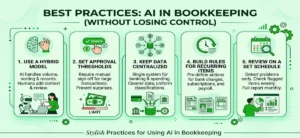
The thing is, automation can be useful but only when done thoughtfully. Such practices will ensure the system is correct and your finances are controlled.
- Use a hybrid model. Allow AI to do volume, sort, compare, write up records and have a human person go through and add context.
- Set approval thresholds. Make reimbursements or bill payments over a specific dollar amount require sign-off so that you can become aware of surprises before they strike your account.
- Keep your data centralized. Having a single system to run your banking and spending implies cleaner metadata and more uniform classification.
- Build rules for recurring items. Specify in advance what the system is to do with bank charges, subscriptions and payroll, lest it guess.
- Review on a set schedule. Problems can be detected early by a check of flagged items once a week and a full report once a month.
This form of computerized bookkeeping is precisely what makes the difference between the businesses that believe their figures and those that continue to triple-check everything by hand. Most owners actually transition to outsourced bookkeeping services after their volume of transactions surpasses a DIY system.
Why Small Businesses Work With Outsourced Accountants
Repetitive work is managed by software, yet you still have to look at the output, pick up the exceptions and make the judgment calls that safeguard your business. That is where Outsourced Accountants come in, AI-assisted tools with human supervision of the work so that you can obtain the speed of automation without losing control.
You no longer have to deal with software settings and miscategorized transactions so that you can create an architecture that fits your business. You have a team that already understands how to configure, trAIn and audit these systems to fit your business.
Final Thoughts
AI bookkeeping will not eliminate financial judgment but it will eliminate the monotonous tasks that prevent the owners of small businesses from working on growth. Begin with a platform that is appropriate to your volume of transactions, trAIn it correctly within the first 30 days and mAIntAIn a human in the loop to make the decisions that do matter.
In case you would prefer not to undertake the setup and maintenance at all, you can have Outsourced Accountants construct and run this workflow on your behalf with the speed of AI and the wisdom of a small accounting team.
Frequently Asked Questions
What Is AI Bookkeeping?
AI bookkeeping involves machine learning, OCR and natural language processing to automate standard accounting processes such as categorizing transactions, reconciling bank statements and reading receipts. It minimizes the need to enter data manually and raises any red flag on anything suspect to manual scrutiny.
How Does AI Bookkeeping Work?
The program scans financial papers with OCR, learns how you classify transactions in the past, compares the bank feed with existing records and identifies inconsistencies that do not correspond to anticipated patterns. It enhances precision with time as you rectify its errors.
Is AI Going To Substitute A Bookkeeper?
No. AI is good at high-volume, repetitive work but it is not able to apply business judgment, interpret tax law or do other odd transactions in the manner that an experienced bookkeeper can. A combination of both is best utilized by most businesses.
Can AI Bookkeeping Be Accurate?
After 2-3 months of regular usage and correction, modern platforms usually achieve 85-95% categorization accuracy. The error is high in the initial few weeks and decreases in case of unusual or one-off transactions which do not follow the patterns learnt.
What Are The Benefits Of AI Bookkeeping?
The key advantages include a considerable amount of time lost, reducing the number of manual errors, real-time visibility of the cash flow and costs are lower than a full in-house bookkeeping team.
What Is The Most Suitable AI Bookkeeping Software For Small Businesses?
It depends on your needs. QuickBooks Online and Xero can be used as a complete platform, Wave is a good free solution for solo operators and companies such as Dext or AutoEntry provide a specialized receipt capture over an existing platform.
What Is The Cost Of AI Bookkeeping?
Costs range from free (Wave) to $15–$90/month for a DIY platform setup, up to $200–$700/month for a fully managed service that includes human review.
Is AI Accounting Secure For Small Enterprises?
Established sites employ bank-grade 256-bit encryption and are SOC 2 Type II compliant, typically being more secure than emAIl-shared spreadsheets. Before linking your accounts, always read the data retention and third-party sharing policies of a provider.