
The month-end close process is the set of accounting tasks a business completes each month to record, reconcile, and finalize its financial data. Accountants verify transactions, post adjusting entries, reconcile accounts and prepare monthly financial statements. Businesses that follow a repeatable close produce accurate reports, reduce audit risk and make faster decisions.
This guide explains the financial close process step by step. It includes a 10-step workflow, a 5-day closing timeline, a month-end close checklist, practical accounting examples, KPIs, a close tracker template and guidance for small businesses. If you want to understand where bookkeeping ends and accounting begins, read our guide on bookkeeping vs accounting first.
Key takeaways
- The month-end close finalizes the books for one calendar month.
- A Vena Solutions survey found the average close takes 6.2 business days.
- Top-performing finance teams close in 3 to 5 business days.
- A checklist, clear task owners and continuous reconciliation cut close time.
- Small businesses can finish a full close in 3 to 5 days with a lean team.
What Is the Month-End Close Process?
The month-end close process is the routine that turns a month of raw transactions into verified financial statements. Accountants collect data, reconcile accounts, post month-end journal entries, review balances and sign off on the results. The process ends when the team locks the period so no one can change it.
Closing the books produces three core outputs:
- Income statement: shows revenue, expenses and net profit for the month.
- Balance sheet: shows assets, liabilities and equity on the last day of the month.
- Cash flow statement: shows cash movement from operating, investing and financing activities.
The close follows accrual accounting. Accountants match revenue to the month they earn it and expenses to the month they incur them, regardless of when cash moves.
Why Is the Month-End Close Process Important for Businesses?
The month-end close process matters because it gives owners and lenders accurate numbers on a fixed schedule. Without it, errors carry into later months and compound until year-end cleanup takes weeks. A consistent close delivers six direct benefits:
- Accurate financial statements. Reconciled data removes guesswork from reports.
- Better cash flow visibility. Monthly reporting shows when cash runs tight.
- Reliable budgeting and forecasting. Clean history gives forecasts a trustworthy baseline.
- Audit and tax readiness. Current workpapers and support documents reduce audit stress.
- Stronger lender and investor confidence. Banks and investors expect timely monthly reports.
- Easier quarter-end and year-end close. Twelve clean months make the annual close a summary, not a rescue.
A strong close also depends on a solid bookkeeping foundation. Professional bookkeeping services record transactions daily, so the close starts with complete data instead of gaps.
Close your books faster with a simple and ready-to-use checklist.
10 Steps in the Month-End Close Process
The month-end close process has 10 steps, and each step builds on the previous one. Follow this order every month.
Step 1: What Is the First Step? Record All Transactions
The first step is to record every transaction for the month. Enter bank deposits, customer invoices, vendor bills, credit card charges, payroll and expense reimbursements. Missing a single invoice changes revenue, receivables and tax figures.
Step 2: How Do You Verify Cut-Off? Confirm Period Boundaries
Verify cut-off by checking that each transaction sits in the correct month. Review invoices dated on the last and first days of the month. Confirm that you record January shipments in January, even when the invoice arrives in February.
Step 3: How Do You Reconcile Bank and Credit Card Accounts?
Compare every bank and credit card transaction with the matching statement. Investigate timing differences such as outstanding checks and pending deposits. Investigate every unexplained item the same day you find it. Our guide to bank reconciliation walks through the full process.
Step 4: How Do You Reconcile Accounts Receivable and Accounts Payable?
Match the AR and AP subledgers to the general ledger control accounts. The totals must agree. Review aged receivables, apply unapplied customer payments and confirm that unpaid vendor bills sit in the right period.
Step 5: What Adjusting Entries Do You Post?
Post month-end journal entries that capture activity not yet in the ledger. The most common adjusting entries are:
- Accrued expenses: costs you incurred but did not yet pay or invoice.
- Accrued revenue: income you earned but did not yet bill.
- Prepaid expenses: costs you paid in advance and spread over several months.
- Deferred revenue: customer payments you received before you deliver the service.
- Depreciation: the monthly cost of fixed assets.
Teams that understand how debits and credits work post these entries with fewer errors.
Step 6: How Do You Handle Payroll and Fixed Assets?
Reconcile payroll registers to the general ledger. Confirm wages, taxes and benefits match your payroll provider reports. Then review fixed asset additions, disposals and depreciation schedules.
Step 7: How Do You Review the Trial Balance?
Run an unadjusted trial balance, post adjustments, then run an adjusted trial balance. Total debits must equal total credits. Review every balance sheet account for unusual amounts, such as a negative cash balance or a stale clearing account.
Step 8: How Do You Perform Variance Analysis?
Compare current results with the prior month, the prior year and the budget. Investigate any variance above a set threshold, for example 10% or $5,000. Write a one-sentence explanation for each material variance.
Step 9: How Do You Prepare Financial Statements?
Generate the income statement, balance sheet and cash flow statement from the reconciled ledger. Check that net income on the income statement matches the change in retained earnings on the balance sheet. A controller or senior accountant reviews the package before release.
Step 10: How Do You Finalize and Lock the Period?
Archive reconciliations, journal entry support and workpapers in one organized folder. Lock the accounting period in your software. Send the management report to owners and stakeholders. Record what slowed the close so the next month runs faster.
Month-End Close Checklist for Businesses
A month-end close checklist lists every task in the order the team must complete it. The checklist assigns an owner, sets a deadline and tracks status. Order matters. Record bank transactions before you reconcile bank accounts.
Use the checklist below as your base. Our guide on what bookkeeping services include shows which of these tasks routine bookkeeping already covers.
| # | Task | Responsible person | Deadline | Status |
| 1 | Record all bank, credit card, AR and AP transactions | Bookkeeper | Day 1 | Not started |
| 2 | Collect pending expense reports and vendor invoices | Department heads | Day 1 | Not started |
| 3 | Reconcile bank and credit card accounts | Bookkeeper | Day 2 | Not started |
| 4 | Reconcile AR and AP subledgers to the general ledger | Accountant | Day 2 | Not started |
| 5 | Reconcile payroll to the general ledger | Accountant | Day 2 | Not started |
| 6 | Post accruals and prepaid expense entries | Accountant | Day 3 | Not started |
| 7 | Record depreciation and fixed asset changes | Accountant | Day 3 | Not started |
| 8 | Review the adjusted trial balance | Controller | Day 3 | Not started |
| 9 | Complete variance analysis with commentary | Controller | Day 4 | Not started |
| 10 | Prepare income statement, balance sheet and cash flow statement | Accountant | Day 4 | Not started |
| 11 | Review and approve the financial package | Business owner or CFO | Day 5 | Not started |
| 12 | Archive workpapers and lock the period | Controller | Day 5 | Not started |
Month-End Close Template: Sample Close Tracker
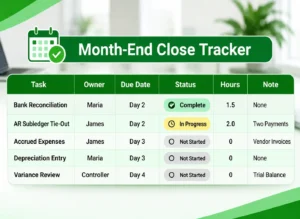
A close tracker shows the live status of every task. Copy the table into Excel or Google Sheets and update it daily.
| Task | Owner | Due date | Status | Hours spent | Blocker or note |
| Bank reconciliation | Maria | Day 2 | Complete | 1.5 | None |
| AR subledger tie-out | James | Day 2 | In progress | 2.0 | Two unapplied payments |
| Accrued expenses | James | Day 3 | Not started | 0 | Waiting on vendor invoices |
| Depreciation entry | Maria | Day 3 | Not started | 0 | None |
| Variance review | Controller | Day 4 | Not started | 0 | Needs final trial balance |
How Long Does the Month-End Close Process Take?
The average month-end close takes 6.2 business days, according to a recent Vena Solutions survey. High-performing teams finish in 3 to 5 business days. Mid-sized companies commonly need 8 to 10 business days. A close that runs past 10 days signals manual work, disconnected systems or unclear ownership.
These factors change close time:
- Transaction volume. More transactions mean more reconciliation work.
- Number of entities and currencies. Each entity adds intercompany matching.
- Manual processes. Vena’s research cites Ledge data showing 94% of teams still use Excel to run the close, and 50% say it slows them down.
- System integration. Disconnected bank, payroll and billing tools force manual data entry.
- Team size and experience. Lean teams that depend on one person risk delays.
Example: A 5-Day Month-End Close Timeline
This schedule works for a small or mid-sized business that closes on the fifth business day.
| Day | Focus | Key tasks |
| Day 1 | Collect and record | Record all transactions, collect expense reports, request vendor invoices, confirm cut-off |
| Day 2 | Reconcile | Reconcile bank, credit card, AR, AP and payroll accounts |
| Day 3 | Adjust | Post accruals, prepaid expenses and depreciation, then run the adjusted trial balance |
| Day 4 | Review and report | Complete variance analysis, then prepare the three financial statements |
| Day 5 | Approve and lock | Controller reviews, owner approves, team archives workpapers and locks the period |
Practical Accounting Examples
Three entries appear in almost every close. These examples show how each one changes the monthly accounts.
Example 1: Unpaid customer invoice
Your business delivers $4,800 of services on January 28 and sends the invoice. The customer pays in February. You earn the revenue in January, so you record it in January.
| Account | Debit | Credit |
| Accounts Receivable | $4,800 | |
| Service Revenue | $4,800 |
The entry raises January revenue by $4,800 and adds $4,800 to receivables on the balance sheet.
Example 2: Accrued expense
A consultant works 25 hours at $100 per hour in January but invoices you in February. You owe $2,500 for January work, so you accrue the expense in January.
| Account | Debit | Credit |
| Consulting Expense | $2,500 | |
| Accrued Liabilities | $2,500 |
The entry lowers January net income by $2,500 and adds a $2,500 liability. In February, you reverse the accrual when the invoice arrives.
Example 3: Depreciation entry
Your business buys equipment for $36,000 with a five-year life and no salvage value. Straight-line depreciation equals $36,000 ÷ 60 months, or $600 per month.
| Account | Debit | Credit |
| Depreciation Expense | $600 | |
| Accumulated Depreciation | $600 |
The entry lowers monthly profit by $600 and reduces the equipment’s book value on the balance sheet. It uses no cash.
Common Month-End Closing Mistakes Businesses Should Avoid
The most common month-end closing mistakes come from missing data, late inputs and skipped reviews. Avoid these seven errors:
- Skipping reconciliations. Unreconciled accounts hide duplicate payments, bank errors and fraud.
- Missing accruals. Unrecorded expenses overstate profit.
- Ignoring cut-off. Transactions in the wrong month distort both months.
- Posting entries without support. Journal entries need invoices, contracts or calculations.
- Using no checklist. Teams without a checklist forget tasks and repeat work.
- Relying on one person. If one accountant holds all the knowledge, absence stalls the close.
- Falling behind on prior months. Each open month adds errors to the next one.
If your books already trail by several months, catch-up bookkeeping restores clean records before you start a monthly close routine.
How to Make the Month-End Close Process Faster and More Accurate
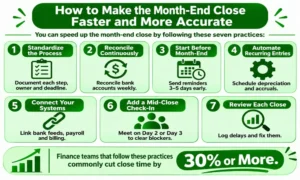
You make the month-end close faster by moving work out of the final week. Apply these seven practices:
- Standardize the process. Document each step, owner and deadline in one close calendar.
- Reconcile continuously. Reconcile bank accounts weekly instead of once a month.
- Start before month-end. Send vendor and expense reminders three to five days before the period ends.
- Automate recurring entries. Schedule depreciation, prepaid amortization and recurring accruals.
- Connect your systems. Link bank feeds, payroll and billing to your accounting software.
- Add a mid-close check-in. Meet on Day 2 or Day 3 to clear blockers.
- Review each close. Spend 15 minutes after each close to log delays and fix them.
Finance teams that follow these practices commonly cut close time by 30% or more, according to vendor benchmarks from HighRadius and Vena.
Month-End Close KPIs to Track
KPIs show whether your close improves. Track these four metrics every month.
| KPI | What it measures | Target |
| Close cycle time | Business days from month-end to period lock | 3 to 5 days |
| Unreconciled accounts | Share of balance sheet accounts without a completed reconciliation at sign-off | 0% |
| Outstanding journal entries | Number of entries drafted but not posted at close | 0 |
| Reporting accuracy | Post-close adjustments per month after reports go out | 0 to 1 |
Month-End Close Process for Small Businesses vs. Large Businesses
Small businesses run a shorter and simpler close than large businesses. Large businesses add entities, currencies and approval layers. The core steps stay the same.
| Factor | Small business | Large business |
| Typical close time | 3 to 5 business days | 6 to 10+ business days |
| Team | 1 to 3 people, often outsourced | Dedicated accounting team |
| Accounts to reconcile | 5 to 20 | 100s to 1,000s |
| Entities | One | Several, with intercompany entries |
| Tools | Cloud accounting software, spreadsheets | ERP and close management systems |
| Review layers | Owner or one accountant | Controller, CFO and auditors |
Small Business Example: Closing With a Limited Team
A small business can close in four days with one bookkeeper and an owner. Consider a landscaping company with $1.2 million in annual revenue and 12 employees. It has two bank accounts, one credit card and one payroll provider.
- Day 1: The bookkeeper categorizes all bank and credit card transactions. The owner sends open job invoices.
- Day 2: The bookkeeper reconciles both bank accounts, the credit card and payroll. This takes about three hours.
- Day 3: The bookkeeper posts accrued fuel costs, prepaid insurance and equipment depreciation. The bookkeeper then reviews the trial balance.
- Day 4: The owner reviews the profit and loss statement and balance sheet. The bookkeeper locks the month.
The company saves time by reconciling bank accounts every Friday and by using a recurring entry for depreciation.
When Should a Business Outsource Its Month-End Closing?
A business should outsource its month-end closing when the close regularly runs past 10 days, errors repeat or the team lacks accounting expertise. Outsourcing gives a business a trained accounting team, a fixed schedule and consistent controls without a full-time hire.
Consider outsourcing when you see these signs:
- You close later than the 15th of the following month.
- Your reconciliations carry unresolved items for more than 30 days.
- One employee holds all close knowledge.
- Your lender, investor or auditor requests reports you cannot deliver on time.
- The owner spends more than 10 hours each month on bookkeeping.
- Your business grows and adds entities, locations or higher transaction volume.
Outsourcing also converts a fixed salary cost into a predictable monthly fee. Firms that handle outsourced bookkeeping 101 for small to medium deliver reconciled books, adjusting entries and financial statements on a set calendar.
Reduce month-end stress with expert accounting support.
Conclusion
The month-end close process turns a month of transactions into accurate, reviewed financial statements. Follow the 10 steps, use the checklist and 5-day timeline, track the four KPIs and reconcile throughout the month. A disciplined close gives you reliable numbers, faster decisions and fewer surprises at tax time and audit time.
Frequently Asked Questions
What is the month-end close process in accounting?
The month-end close process is the sequence of accounting tasks that finalizes a month’s financial records. Accountants record transactions, reconcile accounts, post adjusting entries, review variances and produce financial statements. They then lock the period.
What are the steps in the month-end close process?
The 10 steps are: record transactions, verify cut-off, reconcile bank accounts, reconcile AR and AP, post adjusting entries, handle payroll and fixed assets, review the trial balance, run variance analysis, prepare financial statements and lock the period.
How long does a month-end close take?
The average close takes 6.2 business days, based on a Vena Solutions survey. High-performing teams close in 3 to 5 days. Small businesses with simple operations often finish in 3 to 4 days.
What is the difference between month-end close and year-end close?
Month-end close finalizes one month and happens 12 times a year. Year-end close finalizes the full fiscal year. It adds tasks such as closing temporary accounts to retained earnings, supporting tax filings and preparing for audits.
What is a month-end close checklist?
A month-end close checklist is a task list with owners, deadlines and status. It lists tasks in execution order, from recording transactions to locking the period. It prevents missed steps and shows progress at a glance.
What are month-end journal entries?
Month-end journal entries are adjustments that bring the ledger up to date. Common examples include accrued expenses, prepaid expense amortization, deferred revenue and depreciation. Each entry needs a clear description and supporting documents.
What is the difference between bookkeeping and the month-end close?
Bookkeeping records daily transactions. The month-end close verifies those records, adjusts them and turns them into financial statements. Learn more in our comparison of bookkeeping vs accounting.
Can a small business do its own month-end close?
Yes. A small business can complete the close in 3 to 5 days with a checklist, cloud accounting software and weekly bank reconciliations. The owner should approve the final reports.