

Choosing Bookkeeping Software for a business should never seem like a part-time job. However, that is what happens to the majority of founders. You have 5 browser tabs open, read three lists of the best, and feel more bewildered than you were before. None of them informs you of one thing which you really need to know: when software is no longer sufficient.
More than 64% of small businesses use some type of accounting software, but almost a third continue to outsource in the first two years. Why? Since a tool can record transactions. It is unable to detect an item of incorrect classification or warn you of a cash flow issue before it causes you harm.
In this guide, you will receive an authentic comparison table, truthful cost estimates and a decision framework that is made up of real client work, not rehashed opinions. It is authored with a trench perspective in the Outsourced Accountants, where we have personally experienced what tools apply to the scale of business and which ones silently stifle the business.
What Is Bookkeeping Software? (Bookkeeping Software vs. Accounting Software)
Bookkeeping software takes care of the daily accounting of your financial activities. All your sales, expenses, invoices and payments are recorded in a general ledger. Imagine it to be the engine that parses raw financial data and brings your books up to date.
Accounting software takes it a step further. It uses the same ledger data and transforms it into intelligence: financial statements, tax preparation, forecasting, and compliance reporting. This is the operational distinction most guides leave out, since bookkeeping software is designed to handle financial records whereas accounting software is designed to interpret them (what it means and what to do next). A lot of modern platforms cross this boundary by offering the two functions as a single cloud accounting platform. However, the fundamental division still counts when you need to determine what your business actually requires.
What to Look for in Bookkeeping Software for Small Business
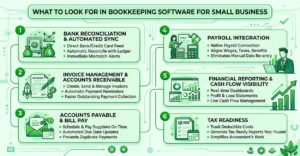
Not every platform is created equally, and choosing the wrong one wastes your time that you cannot afford. There are six basic jobs that the right bookkeeping software for small business should cope with. Lose a platform that stumbles on at least one of them.
Bank Reconciliation & Automated Transaction Sync
Your software must be able to retrieve transactions directly from your bank and credit cards and automatically reconcile with your ledger. Good automated bookkeeping systems will indicate a mismatch immediately rather than hiding it until the end of the month. The time spent on manual bank reconciliation consumes about 3-5 hours per month for a typical small business- automation takes it down to a few minutes.
Invoice Management & Accounts Receivable
Find programs that will allow you to make, send, and manage invoices without having to go off the platform. Good invoice management will involve automatic payment reminders and late-fee activation. Companies automating accounts receivable collect their outstanding payments 2 times faster than when they are pursuing them by hand.
Accounts Payable & Bill Pay
This option automatically plans and pays your suppliers on schedule, each time. Strong accounts payable applications automatically update due dates straight onto your calendar, and alert you to duplicate payments before occurrence, which costs small businesses as much as thousands annually.
Payroll Integration
Your accounting system should not be a standalone. Native payroll integration aligns wages, taxes and benefits directly to your ledger. Therefore, you no longer have to manually re-enter numbers per pay cycle.
Financial Reporting & Cash Flow Visibility
Real-time dashboards are more important than prettiness in reports. The great financial reporting provides you with profit-and-loss statements and balance sheets as you need them. And live cash flow management provides you with the true picture of what is coming in and out as it happens, before it becomes an issue.
Tax Readiness
The most appropriate platforms plan deductible costs and create tax-ready reports throughout the year, not only during April. The solid tax preparation features save your accountant time and save you the hassle of scrambling each season of filing.
Best Small Business Accounting Software for 2026 Compared
Suffice it to theory and this is the stacking of the actual platforms. We have experimented with pricing, features, and usability of the six tools that founders request the most. Prices change frequently, so always check the latest rates before you lay a bet.
| Software | Best For | Starting Price | Free Trial | AI Features | Rating |
| QuickBooks Online | Growing startups, accountant collaboration | $19/mo | Yes | Yes (Intuit Intelligence) | 4.0/5 |
| Xero | Scaling businesses, multi-user teams | $20/mo | Yes | Limited | 4.2/5 |
| Wave | Free/bootstrapped businesses | Free | No | No | 4.4/5 |
| Zoho Books | DIY founders | Free–$50/mo | No | Basic | 4.6/5 |
| FreshBooks | Freelancers/solopreneurs | $21/mo | Yes | Basic | 4.6/5 |
| Mercury + accounting stack | Startup banking + bookkeeping combo | Free (banking) | N/A | Yes | — |
- QuickBooks Online will be the choice, in case you intend to hire an external accountant. it is the platform most bookkeepers are already familiar with. The interface is old-fashioned in comparison with more recent tools, but the support of the ecosystem is unparalleled.
- Xero is brilliant for businesses with more than one team member with books. Its multi-user pricing and permission controls are superior to QuickBooks when it comes to teams that grow, but the AI functions still lag.
- Wave is the best free choice on this list. You will lose a few layers of automation but with a bootstrapped business that is looking at every dollar, it is difficult to do better than $0/month.
- Zoho Books gives prizes to founders who are ready to roll up their sleeves. It is cheap and easy to use, but it will have a higher learning curve compared to FreshBooks or QuickBooks.
- FreshBooks was designed to accommodate solopreneurs and freelancers, not businesses with multiple employees. Invoicing and time tracking are simple here, but become thin as you add payroll or complicated reporting requirements.
- Mercury + accounting stack is not a bookkeeping solution in and of itself, and it is a banking platform that can be integrated with others. Combine it with QuickBooks or Xero, and you have clean, automatic transaction syncing at first glance.
One of the themes in all six: software is used to record, but cannot record the gaps in strategies. It is typically at that point that founders begin to consider outsourcing their bookkeeping to augment what the tools are unable to achieve.
Online Bookkeeping Software for Small Business: Cloud vs. Desktop
This is one of the choices that most guides do not even consider: cloud vs desktop. When considering an online bookkeeping software solution for small businesses, you are already inclined towards cloud-based software, and rightly so.
QuickBooks Online, Xero, and Wave are cloud accounting programs, which are located on the internet and not on your hard disk. You access them everywhere and from any device; your data is automatically backed up, and updates are automatically presented without you even lifting a finger. You and various members of your team can work in the same file at the same time. No emailing of backup files back and forth, no version mix-up.
Desktop software, and believe it or not, QuickBooks Desktop is still available, and it has its devotees. Some businesses prefer these Digital Bookkeeping Tools because they offer full software ownership, require no monthly subscription, and keep financial data stored locally rather than on third-party servers. But the tradeoffs are accumulated quickly. Desktop applications do not support real-time collaboration, updates have to be installed manually, and remote access is either a bulky workaround or additional hosting costs.
Statistics speak louder than words: more than 78% of small businesses now operate their business accounting tools in the cloud, and the percentage of cloud technology adoption is increasing annually. Cloud is the smarter default in 2026 unless you have a particular reason to remain offline, such as poor internet connectivity or stringent data residency regulations.
AI Bookkeeping Software for Small Business: What’s Actually Useful in 2026
All platforms nowadays boast of AI, but most of it can hardly move the needle. AI bookkeeping software for small businesses performs two tasks very well: the categorization of transactions and the detection of anomalies. It gets to know how you spend and automatically classifies your expenses into the correct buckets and alerts you about a duplicate charge or a suspicious payment.
Automated bookkeeping has really helped in expense tracking and income tracking; AI-based categorization is hitting about 90-95% accuracy on simple transactions, significantly reducing the time taken to do manual entries.
Nonetheless, AI Bookkeeping for Small Businesses has made routine financial tasks faster and more efficient. However, AI quickly reaches a limit. It cannot make judgment calls about uncertain expenses, design tax-optimal transactions, or apply business context to rare financial situations. Fundraising preparation, R&D credit qualification, and multi-entity structuring require a person with insight into your business, not a pattern-recognition algorithm. We use AI as a filter and not a decision-maker at Outsourced Accountants. That is the straight line that most software vendors will not draw for you.
Make confident bookkeeping decisions with expert support
Free vs. Paid Bookkeeping Software: What’s the Real Cost?
Free is hardly free when your business expands. The following is the overall cost of ownership that the competitors avoid.
Free plans typically have fast limits, such as capped invoices, no accounts payable automation, or an absolute user limit. Premium plans impose fees based on each transaction (2.9% plus 30 per charge) and optional fees on payroll ($40-80/month) and enhanced accounts receivable.
Then the invisible price that no one calculates is your own time. When you are taking 6-8 hours per month to reconcile and report rather than operate your business, then that is not free, but rather a trade. At a small opportunity cost of $50/hour, that would be 300-400 hours a month that you did not budget. Do the actual math, then choose the free default.
When Software Alone Isn’t Enough (Signals You’ve Outgrown DIY Bookkeeping)
Data is entered using software. It does not deal with strategy. Here’s when the gap starts to hurt.
The large one is investor reporting pressure. Investors desire clean, GAAP-compliant financial reports quickly and not a QuickBooks export with three uncategorized transactions. Multi-entity or multi-currency complexity is another complexity that suffers from most native capabilities of software; you end up creating manual workarounds that are consuming more time than they are protecting.
Be aware of these as well: the eligibility of the research and development tax credit (software won’t alert you on the same), fundraising due diligence requests with short-notice book requirements, and just the math on time versus cost of hiring. Once bookkeeping consumes more than 5-6 hours of a founder’s week, it is time to outsource.
This is precisely what we constructed Outsourced Accountants to fill in – not to substitute your software but to add the judgment and the approach on top of it that no algorithm can offer yet.
How to Choose the Right Bookkeeping Software for Your Business?
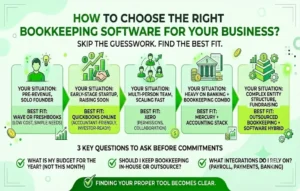
Skip the guesswork. Find a fit for your situation.
| Your Situation | Best Fit |
| Pre-revenue, solo founder | Wave or FreshBooks (low cost, simple needs) |
| Early-stage startup, raising soon | QuickBooks Online (accountant-friendly, investor-ready) |
| Multi-person team, scaling fast | Xero (permissions, collaboration) |
| Heavy on banking + bookkeeping combo | Mercury + accounting stack |
| Complex entity structure, fundraising | Outsourced bookkeeping + software hybrid |
There are three questions to ask yourself before commitments: What is my budget this year, not this month? Should I keep bookkeeping in-house or outsource the time-consuming tasks with Online Bookkeeping Services for Small Business? And what integrations does my business really rely on: payroll, payments, and banking? Those who truthfully answer, and the proper tool becomes clear in a short time.
Bookkeeping Software Integrations That Actually Matter
The good of a platform is what it links to. Ahead of time, verify whether it is compatible with the tools you are already running.
Payment Processors & E-Commerce Platforms
In case you sell online, your bookkeeping software should have a neat connection with Stripe, PayPal, Shopify, or Amazon. You cannot do without it, as you would have to manually reconcile hundreds of small transactions every month, a time-waster that should have been automated many years ago. Find real-time syncing, not a nightly batch import that has your numbers stale.
CRM & Project Management Tools
A connection between a bookkeeping system and a CRM, such as HubSpot or a project management application, such as Asana, bridges the gap between sales and revenue recognition. It seems petty until you are scurrying after which invoice is closed, deal by deal.
Tax Software & Filing Tools
Integration with tax packages, which is native to TurboTax or a direct handoff to an accountant, saves hours at each filing season. The most appropriate bookkeeping software will export sorted, neat data that your accountant can utilize without the need to reformat it.
The rule of thumb: estimate the number of manual exports you would have to do every month using a particular platform. When more than two or three in the answer, continue searching.
How to Switch Bookkeeping Software Without Losing Your Financial History?
When you grow out of your existing platform, it does not imply starting at the ground level. Professional Bookkeeping Services ensure your financial data is migrated accurately and preserving clean records throughout the transition. But a messy migration may cost you clean books, and that is a thing that will come back to haunt you when you next need to raise capital or make tax returns.
Export Everything Before You Touch Anything
Back up all your invoices, bills, bank reconciliation history and all the general ledger before you cancel anything in a CSV or PDF format. The majority of platforms store or erase information soon after the end of a subscription, and you do not want to discover it too late.
Run Both Systems in Parallel for One Month
Don’t go cold turkey. Keep your old platform live for 30 days as your new platform goes live. This overlap detects sync errors, missing categories, or broken automations before they become a snowball into a literal mess.
Reconcile Your Opening Balances
Your new program must have correct opening balances in all accounts, cash, accounts receivable, accounts payable, the works. Get this wrong, and all the reports you draw out hereafter absorb the error. This is the most likely thing on this list to leave a headache immediately after migration.
Bring In a Second Set of Eyes
It is precisely in migrations that an external bookkeeper makes his money. Eyes on clean paper verifying your opening balances and mapping of categories before they multiply over months.
Industry-Specific Bookkeeping Software: What Changes by Business Type
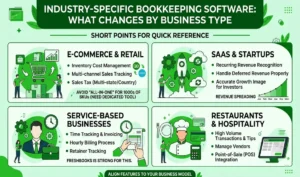
Plug-and-play advice can only go so far. The important features are determined by your industry. Understanding what a bookkeeper does for a Small Business helps you choose tools and processes that match your daily financial needs. A professional bookkeeper records transactions, reconciles accounts, tracks cash flow, and keeps your financial records accurate, allowing you to make informed business decisions with confidence.
E-Commerce & Retail
You require software to manage inventory costing, multi-channel sales tracking and sales tax across states or countries. Both QuickBooks Online and Xero have good inventory add-ons, but neither of them can be considered a substitute to a dedicated inventory tool in case the business runs thousands of SKUs.
SaaS & Startups
The make-or-break here is recurring revenue recognition. Your software should be able to deal with deferred revenue properly, which is to recognize subscription revenue as it grows over time, not as a single lump sum, or your financials will reflect an image of your true growth to investors.
Service-Based Businesses
Time tracking and invoicing for project-based businesses is more important than inventory can ever be. This use case is what FreshBooks has based all its reputation on, and it is reflected in the ease with which it processes hourly billing and tracks retainers.
Restaurants & Hospitality
The volume of transactions and tips, tax rates, and payments to the vendors present another type of complexity. Find software that has good point-of-sale integration; otherwise, you are recalculating daily sales manually, which is completely counterproductive to automation.
The lesson learned: general reviews are not enough to choose software. Align the feature set to the way your particular business makes and spends money.
Ready to Move Past DIY Bookkeeping?
The right software solves half the problem. The other one is knowing when a tool requires a human to support it. And when you are considering making such a decision now, come to our team; we can assist you in determining where exactly your business is and what really makes sense now.
Frequently Asked Questions
Which is the most suitable bookkeeping software in business?
It is based on your level. QuickBooks Online is best for growing startups utilizing accountants, Xero is best with multi-user groups, and Wave is best with bootstrapped organizations that require a simple, free solution.
What is the difference between bookkeeping software and accounting software?
Yes. Daily transactions are recorded by bookkeeping software in a general ledger. Accounting software uses that data to create financial statements, tax reports and forecasts.
What’s the best free bookkeeping software for small business?
Although it does not have the automation capabilities of paid software such as QuickBooks or Xero, Wave is free and provides good invoicing, expense tracking, and reporting.
Will AI bookkeeping software kill off a bookkeeper?
No. AI is good at categorization and anomaly identification, but it is not capable of making judgement calls on questionable transactions, tax strategy or complicated financial decisions that a human bookkeeper can.
What is the cost of bookkeeping software to a small business?
Estimate between $0-50/month software, and $0-40/month per-transaction payment fees and $0-80/month payroll add-ons. Add in your personal time cost as well; it can quickly accumulate.
At what point does a startup change to outsourced bookkeeping?
When investor reporting requirements become more pronounced, or the complexity of your entity structure or your bookkeeping is consuming over 5-6 hours of your week, outsourcing can usually prove to be the superior choice.
Is it safe to use online bookkeeping software as a start-up?
Yes, trusted cloud providers have bank-grade encryption and two-factor authentication. Find SOC 2 compliance and frequent security audits before sending your financial information to a platform.
Do I need a bookkeeper if I use bookkeeping software?
Not necessarily – simple businesses in their early stage may many times get away with software only. However, with increased complexity, a bookkeeper will detect mistakes and make judgment calls that the software can not.







2 Responses